PES vs DST embroidery files: what each format stores
Last checked: November 26, 2026. This guide is based on research of public sources. We did not test any product.
Short answer
- A PES file is the Brother format. It holds the stitches and the thread colors.
- A DST file is the Tajima format. It holds the stitches and the color-change points, but no thread colors.
- A conversion from PES to DST removes the thread colors. A conversion from DST to PES cannot restore them, so set the colors again.
- The two Brother machines in our guides read PES and DST. The PooLin and Smartstitch machines read DST and DSB.
PES or DST: the short answer
PES and DST are machine files. A machine file holds the stitch positions, the color changes, and the machine commands for one design. It is made for the machine and not for editing, so it does not hold the original design objects. Source [1] Source [2]
The difference between the two formats is thread color. A PES file has a part that holds the design name, the colors, and the machine commands. A DST file holds stitch commands only and contains no colors. Source [3] Source [4]
On a Brother home machine, PES is the better choice, because a DST file shows in default colors. DST is the format for a commercial machine that does not read PES. Source [5] Source [6]
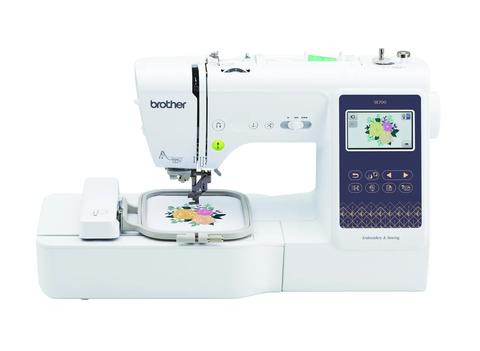
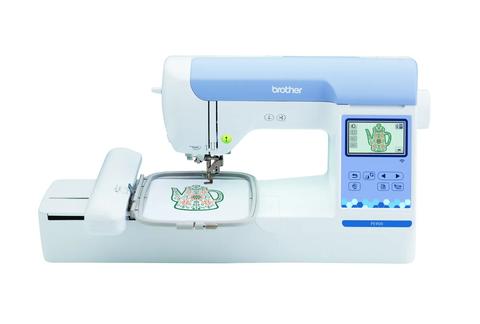
Of the four machines in our guides, Brother SE700 and Brother PE900 read PES, PHC, DST, and PEN files. PooLin EOM and Smartstitch S-1001 read DST and DSB files. PooLin says to convert other formats before transfer. Our guide to single needle and multi needle machines compares the four. Source [5] Source [7] Source [8] Source [9]
What a PES file holds
PES is the format for Brother and Babylock machines. The file has two parts. The PES part holds design data for Brother PE-Design software. The PEC part holds the design name, the colors, the machine commands, and graphics for the machine. Source [10] Source [2] Source [3]
PES versions 1 to 4 use a fixed list of 64 thread colors. Versions 5 and 6 let the software set the threads. Source [3]
Brother home machines also read PHC and PEN files. The SE700 saves its own designs as PHC files. Brother's help page says PEN files come from iBroidery. Source [5] Source [7]
A machine can refuse a PES file that is too large. Brother says a PES file that exceeds the limits for stitches or colors does not show on the machine. The SE700 limit is 100,000 stitches for each pattern. Source [7] Source [5]
What a DST file holds
DST means Data Stitch Tajima. The format comes from Tajima, and most Tajima machines use it. Wilcom calls it a simple stitch file that does not support thread colors or needle assignment. Source [4] Source [6]
The file marks each point where the color changes, but it does not name the color. The operator sets a thread color for each needle at the machine. Source [1] Source [4] Source [11]
A Brother home machine reads a DST file with two limits. The pattern list shows the file name and not a picture. The design shows in the default Brother color order, so the SE700 manual says to check the preview and change the colors. Source [5]
DSB is a stitch data format from Barudan. The PooLin and Smartstitch machines in our guides read it together with DST. Source [12] Source [13] Source [8] Source [14]
Embroidery file formats by machine brand
| Format | Machine brands | What the file stores |
|---|---|---|
| PES | Brother, Babylock | Stitches, thread colors, machine commands, and design data for Brother PE-Design software |
| DST | Tajima. Also read by Brother home machines, PooLin, and Smartstitch | Stitch commands and color-change points. No thread colors |
| DSB | Barudan. Also read by PooLin and Smartstitch | Stitch data |
| JEF | Janome | Stitch data. The default format for current Janome machines |
| EXP (BERNINA USB) | BERNINA | Three files: the design (EXP), the thread colors (INF), and a preview picture (BMP) |
| EXP (Melco) | Melco | The design only. No thread colors |
| ART | BERNINA software. This is a design file, not a machine file | Object outlines, properties, stitches, thread colors, and a thumbnail picture |
Sources for this table: Source [10] Source [2] Source [15] Source [3] Source [4] Source [12] Source [13] Source [16] Source [17] Source [5] Source [8] Source [14]
Janome says JEF is the default format for all its current embroidery machines. When a design is not sold in JEF, software must convert it. Source [16]
BERNINA software lists EXP as the format for a BERNINA USB stick. OESD says the BERNINA B990, 830, 7 series, 580, 630, and 640 read EXP files. The BERNINA type of EXP has a separate file for thread colors, and the Melco type has none. Source [2] Source [17]
What a conversion loses
Embroidery software does the conversion. Ink/Stitch lists DST as a format that it reads and PES as a format that it writes. Hatch Embroidery also reads DST and writes PES. Smartstitch names Ink/Stitch as free software. Source [18] Source [10] Source [9]
- PES to DST: the thread colors are lost, because DST does not support them. Ink/Stitch can export a thread list and apply it to a DST file later. Source [6] Source [19]
- DST to PES: the software cannot restore the thread colors, because the DST file never held them. Set each thread color again in the software or at the machine. Source [20] Source [5]
- Either direction: the result is a machine file. Software can try to rebuild the design objects from the stitches, but Wilcom says the result may not match the original design. Source [1]
- Size changes: when a machine file is resized, the stitch count stays the same and the stitch density changes. Wilcom advises a size change of no more than about 10 percent. Source [1]
Keep the design file from the embroidery software as the master copy. Hatch says to save the EMB design file first and then export the machine file. Source [21]
How to move the file to the machine
The Brother machines read designs from a USB flash drive. Brother says to save the files in the root directory of the drive, because the machine cannot open files in a folder. The SE700 manual adds that some USB flash drives do not work with the machine. Source [7] Source [5]
Janome says to put designs in the EMB / EMBF sub-folder on the drive. Smartstitch machines take DST and DSB designs by Wi-Fi or USB. Source [16] Source [14]
The design must also fit the embroidery area. The SE700 accepts patterns up to 4 x 4 inches. Our hoop size chart gives the area for each machine. Source [5]
Questions people ask
- Is PES or DST better for a Brother embroidery machine?
PES. A PES file holds the thread colors. The SE700 manual says a DST file has no thread color information, so the machine shows it in a default color order. Source [5] Source [3]
- How do I convert DST to PES?
Open the DST file in embroidery software and save it as PES. Ink/Stitch reads DST and writes PES. The DST file holds no thread colors, so set the colors after the conversion. Source [18] Source [4] Source [20]
- Why does my DST file show the wrong colors?
A DST file does not contain thread colors. The machine or the software fills in default colors. Brother says to check the preview and change the thread colors. Source [4] Source [11] Source [5]
- What embroidery file format does a Janome machine use?
JEF. Janome says JEF is the default format for all its current embroidery machines. Janome lists some models, such as the MC10000, that read JEF files only. Source [16]
- What embroidery file format does a BERNINA machine use?
EXP. BERNINA software writes EXP for a BERNINA USB stick. OESD says the BERNINA type of EXP is three files: the design, the thread colors, and a preview picture. Source [2] Source [17]